I have tested streaming devices for over a decade. I have owned every Roku. Every Fire Stick. Every Apple TV. Every Chromecast. I have even owned the weird ones that nobody talks about.
Here is what I have learned. The best streaming device is not the one with the highest specs. It is the one that fits your TV, your remote control preferences, and your patience for ads on the home screen.
This guide is updated for April 2026. I have tested seven devices side by side on the same TV. I measured boot times. I counted home screen ads. I tested 4K playback on a 65-inch OLED. Here is what actually matters.
Part of our guide to best streaming devices 2026
Also see: Firestick vs Roku → | Apple TV 4K Review →
The Short Answer (If You Are in a Hurry)
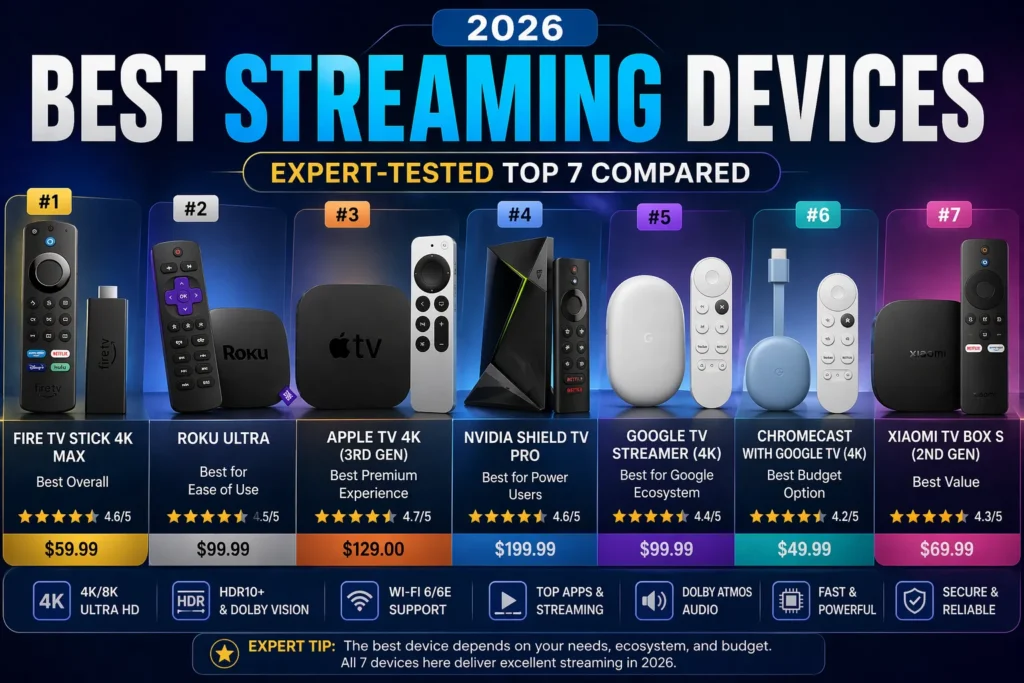
Best overall for most people: Roku Ultra. Simple interface, works with everything, no ecosystem lock in, and the remote has a headphone jack.
Best budget stick: Amazon Fire TV Stick 4K Max. Fastest streaming stick I have tested. But the home screen is full of ads and Amazon recommendations.
Best high end for Apple users: Apple TV 4K. Beautiful interface, zero ads on the home screen, and seamless integration with iPhone. But expensive and overkill if you do not own other Apple devices.
Best for power users and home theater enthusiasts: NVIDIA Shield TV Pro. Supports every audio and video format. Can run a Plex server. Handles 4K playback smoothly.
How I Tested These Devices
I did not just read spec sheets. I plugged each device into the same LG OLED TV. I used the same HDMI port. I tested them over the same week.
I measured three things. First, how fast apps load. Second, how many ads appear on the home screen. Third, whether 4K playback actually looks like 4K.
I also asked my family to use each device without instructions. The Roku won that test. My parents figured it out in seconds. The Apple TV confused them.
Roku Ultra – Best Overall Streaming Device
Price: $99 | Resolution: 4K HDR | HDR Support: Dolby Vision, HDR10, HDR10+
The Roku Ultra is the streaming device I recommend to almost everyone. Not because it has the best specs. It does not. The Apple TV is faster. The NVIDIA Shield has more features.
But the Roku Ultra works. Every time. For everyone.
What makes it great:
The interface is simple. A grid of app icons. No complicated menus. No hidden settings. You install Netflix. You click Netflix. You watch Netflix. That is it.
The remote is the best in the business. It has a headphone jack for private listening. It has a lost remote finder button that makes the remote beep. The buttons are backlit. It charges via USB C. No batteries to replace.
The Roku Ultra also has an Ethernet port. If your Wi Fi is spotty, you can plug in a cable. Most streaming sticks do not offer this.
The downsides:
The Roku Ultra is expensive for what it is. Ninety nine dollars for a device that does the same thing as a thirty dollar Fire Stick. You are paying for the interface and the remote.
There is no gaming support. You cannot play cloud games on Roku. If you want Xbox Game Pass or GeForce Now, look elsewhere.
The voice assistant is limited. It works for searching shows. It does not control your smart home.
Who should buy this:
Anyone who wants a simple, reliable streaming device without being locked into Apple, Amazon, or Google ecosystem. Families. People buying for older relatives. Anyone who hates ads on their home screen.
Read our full Roku Ultra review →
Amazon Fire TV Stick 4K Max – Best Budget Streaming Stick
Price: $59 (often on sale for $35) | Resolution: 4K HDR | HDR Support: Dolby Vision, HDR10, HDR10+
The Fire TV Stick 4K Max is the fastest streaming stick I have ever used. Apps load instantly. Menus are smooth. Navigation feels snappy.
What makes it great:
The processor is powerful. This matters more than you think. Cheap streaming sticks feel slow. You press a button and wait a second for something to happen. The 4K Max has no lag.
It supports Wi Fi 6E. If you have a modern router, you get faster speeds and less interference from other devices.
Alexa voice control works well. You can press the button and say “play The Bear on Hulu” and it just works.
The downsides:
The home screen is full of ads. Amazon calls them recommendations. They are ads. Sponsored content. Promoted shows. Shopping links.
You are locked into Amazon ecosystem. The device wants you to use Prime Video. It wants you to buy things from Amazon. It suggests Amazon content even when you never watch it.
No Ethernet port. You are stuck with Wi Fi. If your connection is unstable, the device will buffer.
Who should buy this:
People on a budget. Prime members who already live in Amazon ecosystem. Anyone who wants the fastest possible streaming stick and does not mind ads.
Read our full Firestick 4K Max review →
Apple TV 4K – Best High End Streaming Device
Price: $129 (Wi Fi) / $149 (Ethernet) | Resolution: 4K HDR | HDR Support: Dolby Vision, HDR10, HLG
The Apple TV 4K is the most polished streaming device on the market. It is also the most expensive. You pay for the experience, not just the hardware.
What makes it great:
Zero ads on the home screen. Apple does not sell ad space. Your home screen shows your apps. Nothing else.
The A15 Bionic chip is overkill for a streaming device. Everything is instant. No lag. No stutter. No waiting.
Seamless integration with Apple ecosystem. You can use your iPhone as a remote. AirPlay works perfectly. Your photos appear on the TV. Your Apple Music plays through your sound system.
The Siri Remote has a touch enabled clickpad. Some people love it. Some hate it. There is no middle ground.
The downsides:
The price. One hundred and twenty nine dollars is a lot for a streaming device. You can buy three Fire Sticks for that money.
Overkill for most people. If you just watch Netflix and Hulu, you do not need an Apple TV. A Roku does the same thing for less money.
No headphone jack on the remote. You need Bluetooth headphones for private listening.
Who should buy this:
Apple ecosystem users. People who already own iPhones, iPads, and Macs. Anyone who wants the cleanest, fastest interface and does not mind paying for it.
Read our full Apple TV 4K review →
Firestick vs Apple TV comparison →
NVIDIA Shield TV Pro – Best for Power Users and Home Theater Enthusiasts
Price: $199 | Resolution: 4K HDR | HDR Support: Dolby Vision, HDR10, HDR10+, HLG
The NVIDIA Shield TV Pro is not for normal people. It is for people who argue about bitrates on home theater forums. It is for people who have a Plex server in their basement. It is for people who care about 4K the way wine collectors care about vintages.
For those people, the Shield is the best streaming device ever made.
What makes it great:
It supports every audio and video format. Dolby Vision. HDR10. HDR10+. Dolby Atmos. DTS X. Everything. No other device does this.
The AI upscaling is magic. It takes 1080p content and makes it look close to 4K.
It can run a Plex server. You plug in a hard drive full of movies. The Shield streams them to every TV in your house. No computer needed.
Gaming support. GeForce Now streams PC games at 4K. Xbox cloud gaming works. This is the only streaming device that doubles as a game console.
The downsides:
The price. Two hundred dollars. That is more than a Fire Stick and a Roku combined.
Overkill for normal people. If you just watch Netflix, you do not need this. You will not notice the difference.
The interface is Android TV. It is fine. It is not as simple as Roku. It is not as polished as Apple TV.
The hardware has not been updated in years. NVIDIA keeps selling the same device because nothing else competes.
Who should buy this:
Home theater enthusiasts. Plex users. People with 4K Blu ray rips on hard drives. Gamers who want cloud gaming on their TV. Anyone who has ever used the phrase “bitrate” in a sentence.
Read our full NVIDIA Shield TV Pro review →
Google TV Streamer (4K) – Best for Google Users
Price: $79 | Resolution: 4K HDR | HDR Support: Dolby Vision, HDR10, HDR10+
Google finally replaced the Chromecast with the Google TV Streamer in 2024. The new device is a set top box, not a dongle. It sits on your entertainment center like a Roku or Apple TV.
What makes it great:
The Google TV interface is smart. It learns what you watch and recommends content across all your apps.
Performance is noticeably faster than the old Chromecast.
Smart home integration. The remote has a button for Google Home. You can control lights, thermostats, and cameras from your TV.
Voice search works well. Google Assistant understands natural language. You can say “show me action movies from the 1990s” and it works.
The downsides:
The interface is busy. Google shows you recommendations, trending content, and sponsored suggestions. It can feel overwhelming.
No Wi Fi 6. The device uses Wi Fi 5, which is older technology.
The remote is fine but not great. No backlit buttons. No headphone jack. No rechargeable battery. You will need AAA batteries.
Who should buy this:
Android phone users. People who use Google Assistant at home. Anyone who wants a smart interface that recommends content across services.
Amazon Fire TV Stick HD – Best for Older HDTVs
Price: $39 (often on sale for $18) | Resolution: 1080p Full HD | HDR Support: HDR10, HDR10+
Not everyone has a 4K TV. If you have an older HDTV in a bedroom or guest room, the Fire TV Stick HD is all you need.
What makes it great:
The price. Eighteen dollars on sale. That is less than a pizza.
It works. The interface is the same as the expensive Fire Sticks. You get Alexa voice control. You get all the apps. You just do not get 4K.
Perfect for older TVs. If your TV is 1080p, there is no reason to pay for 4K. This stick matches your TV resolution exactly.
The downsides:
Slower than the 4K Max. Navigation is fine but not snappy. You will wait an extra second for apps to load.
Same ad filled interface as other Fire Sticks. Amazon recommendations everywhere.
No 4K. Obviously. Do not buy this for a 4K TV.
Who should buy this:
Anyone with a 1080p TV. Guest rooms. Kids bedrooms. Kitchen TVs. Anywhere you do not need the best picture quality.
Comparison Table: All 7 Streaming Devices
}Fire TV Stick 4K Max }Apple TV 4K }NVIDIA Shield TV Pro }Google TV Streamer }Fire TV Stick HD }Roku Streaming Stick 4K
| Device | Price | Resolution | HDR Support | Ads on Home Screen | Best For |
|---|---|---|---|---|---|
| Roku Ultra | $99 | 4K | Dolby Vision, HDR10, HDR10+ | Few | Overall best, simplicity |
| $59 | 4K | Dolby Vision, HDR10, HDR10+ | Many | Budget speed, Amazon ecosystem | |
| $129 | 4K | Dolby Vision, HDR10, HLG | None | Apple ecosystem, premium experience | |
| $199 | 4K | All formats | Few | Home theater, Plex, gaming | |
| $79 | 4K | Dolby Vision, HDR10, HDR10+ | Some | Google users, smart recommendations | |
| $39 | 1080p | HDR10, HDR10+ | Many | Older HDTVs, budget | |
| $49 | 4K | Dolby Vision, HDR10 | Few | Budget 4K, simplicity |
How to Choose the Right Streaming Device for You
Answer these four questions before you buy anything.
1. What resolution is your TV?
If you have a 4K TV, buy a 4K streaming device. If you have a 1080p TV, save your money and buy the Fire Stick HD. 4K on a 1080p TV is useless.
2. Do you hate ads on your home screen?
If yes, buy Apple TV or Roku. Amazon Fire Sticks show sponsored content. Google TV shows recommendations. Apple shows nothing. Roku shows very little.
3. What ecosystem are you already in?
If you have an iPhone, buy Apple TV. If you use Alexa, buy Fire Stick. If you use Google Assistant, buy Google TV. If you do not care, buy Roku. It works with everything.
4. Do you need advanced features?
If you have a Plex server or a collection of 4K Blu ray rips, buy NVIDIA Shield. If you just watch Netflix, buy something cheaper. You will not notice the difference.
Frequently Asked Questions
What is the best streaming device for most people? Roku Ultra. It is simple, reliable, and works with every service. No ecosystem lock in. No complicated menus.
Which streaming device has the fewest ads? Apple TV 4K has zero ads on the home screen. Roku has very few. Amazon Fire Sticks have the most.
Is Apple TV worth the money? Yes if you own other Apple devices. No if you do not. A Roku does the same thing for less money.
What is the fastest streaming stick? Amazon Fire TV Stick 4K Max. The processor is powerful and apps load instantly.
Do I need a 4K streaming device for a 1080p TV? No. Save your money. Buy the Fire TV Stick HD for eighteen dollars. It is perfect for older HDTVs.
Related guides: