
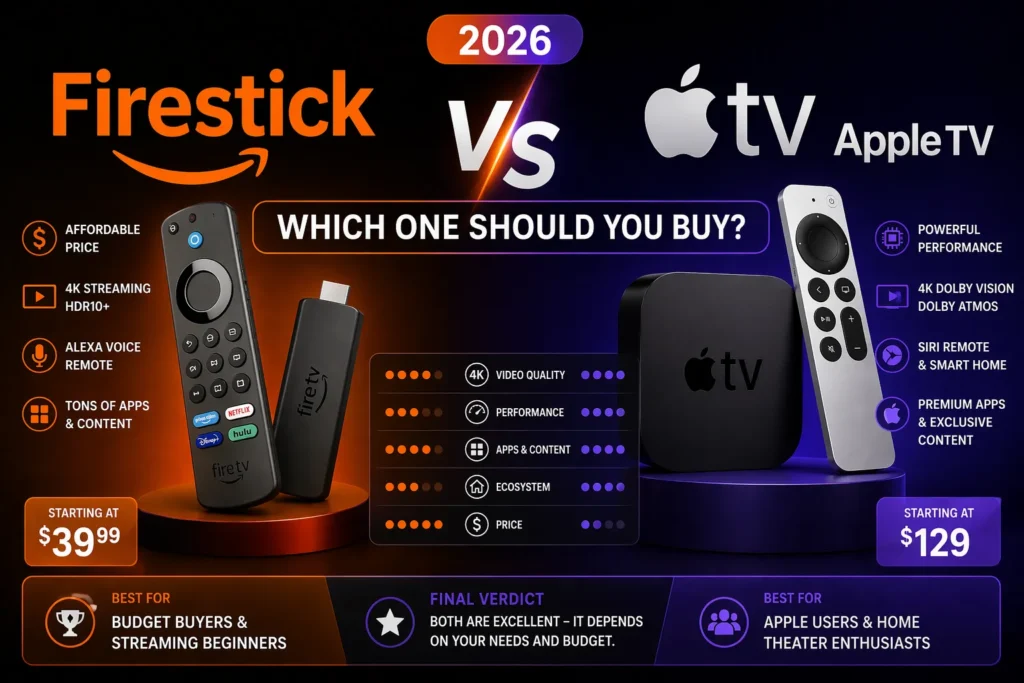
I have used both Amazon Fire Sticks and Apple TV for years. I have a Fire Stick 4K Max in my bedroom. I have an Apple TV 4K in my living room. I switch between them every week.
Here is the honest truth. Both are excellent. But they are excellent for completely different people. One is for people who want value, speed, and Alexa. The other is for people who want polish, privacy, and Apple ecosystem integration.
This guide breaks down every difference. Price. Performance. Interface. Ads. Smart home. Gaming. Remote control. By the end, you will know exactly which one belongs in your living room.
Part of our guide to best streaming devices 2026
Also see: Firestick 4K Max Review → | Apple TV 4K Review → | Firestick vs Roku →
The Short Answer
Choose Firestick 4K Max if you want the fastest streaming stick for the lowest price. It costs fifty nine dollars, often on sale for thirty five. The interface has ads, but the performance is excellent. Alexa voice control works well. And if you are already an Amazon Prime member, the ecosystem integration makes sense.
Choose Apple TV 4K if you own other Apple devices. The integration is seamless. AirPlay works perfectly. Your iPhone becomes a remote. Your photos become a screensaver. And the interface has zero ads. But you pay for that. One hundred and twenty nine dollars minimum.
The real difference is not hardware. Both play 4K. Both support Dolby Vision. The difference is whether you want Amazon selling you things on your home screen or Apple charging you a premium for a clean experience.
Price Comparison
This is not close. Firestick is significantly cheaper. }Apple TV 4K (Wi-Fi) }Apple TV 4K (Ethernet + 128GB)
| Model | Regular Price | Sale Price |
|---|---|---|
| Fire TV Stick 4K Max | $59 | $35 (frequent) |
| $129 | Rarely on sale | |
| $149 | Rarely on sale |
The Fire Stick 4K Max is often available for thirty five dollars. That is less than a third of the Apple TV price. For budget conscious buyers, the decision is already made.
But price is not everything. You get what you pay for.
Performance and Processing Power
Both devices are fast. But Apple is faster.
Apple TV 4K: The A15 Bionic chip is overkill for a streaming device. The same processor that powered the iPhone 13. Apps launch instantly. Navigation is butter smooth. Switching between apps has no lag.
Fire TV Stick 4K Max: Amazon custom processor with 2.0 GHz clock speed and 2GB of RAM. It is the fastest streaming stick I have tested. Apps load almost immediately. Navigating is swift and smooth. But it is not Apple fast.
Winner: Apple TV 4K. The A15 Bionic chip is simply more powerful. But for most people, the Firestick is fast enough. You will not notice the difference unless you are switching between apps constantly.
Interface and Home Screen
This is where the two devices are completely different.
Apple TV interface: Clean. Minimal. Zero ads. Apple does not sell ad space on your home screen. Your apps appear in a grid. Nothing else. The interface is calm. It does not try to sell you things. It does not suggest content you never asked for. It just works.
Firestick interface: Amazon Fire OS is based on Android. The home screen is full of content. Sponsored rows. Recommendations. Shopping links. Amazon wants you to watch Prime Video. It wants you to rent movies. It wants you to buy things.
Winner: Apple TV. The clean interface is a breath of fresh air. No ads. No clutter. No one trying to sell you something every time you turn on your TV.
Remote Control
Both remotes are good. They are just different.
Apple Siri Remote (2nd gen): Aluminum build. Touch-enabled clickpad. Dedicated mute button. Volume controls. USB-C charging. The touch surface is modern. But some people hate it. It lacks tactile feedback. You swipe when you meant to click. The remote is also tiny. Easy to lose between couch cushions.
Firestick Remote: Plastic build. Directional pad. Alexa voice button. Programmable app shortcuts. TV power and volume controls. Uses AAA batteries. No headphone jack. No lost remote finder. But the buttons are physical. You feel them. You know what you pressed.
Winner: Tie. Apple remote is more premium. Firestick remote is more practical. If you hate touch controls, get Firestick. If you want a beautiful remote, get Apple.
Smart Home Integration
This is a major difference.
Apple TV 4K: Acts as a HomeKit hub. Even when you are away from home, your Apple TV can control smart devices. Lights. Locks. Thermostats. Cameras. It processes HomeKit Secure Video locally, encrypting footage before sending it to iCloud. No other streaming device offers this level of privacy and automation.
Firestick 4K Max: Works with Alexa. You can control smart home devices by speaking into the remote. But the Firestick itself is not a hub. You need a separate Echo device for remote access and routines. The Firestick has broader device compatibility. It works with Ring, Philips Hue, Ecobee, and thousands of other brands. But it requires more setup.
Winner: Apple for privacy and seamless automation. Firestick for device compatibility and lower cost.
Gaming Capabilities
Apple TV is better for gaming. Not by a little. By a lot.
Apple TV 4K: Apple Arcade has hundreds of games. No ads. No in app purchases. The A15 Bionic chip handles graphics easily. You can pair a PlayStation or Xbox controller via Bluetooth. Games run smoothly at 4K.
Firestick 4K Max: Supports cloud gaming via Xbox Game Pass Ultimate. You stream games from the internet. The experience depends on your internet speed. Input lag is noticeable. Not ideal for fast paced games. Fine for casual gaming.
Winner: Apple TV 4K. The local processing power makes a huge difference.
Ecosystem Integration
This is the real reason to buy Apple TV.
Apple ecosystem: If you own an iPhone, iPad, or Mac, Apple TV integrates seamlessly. AirPlay lets you mirror your screen instantly. Your photos become the screensaver. Your Apple Music plays through your TV. Your HomePod can control the Apple TV with voice. You can use your iPhone as a keyboard for typing passwords. Everything just works together.
Amazon ecosystem: Firestick works best if you are an Amazon Prime member. Prime Video content is highlighted. Alexa can order things from Amazon. The interface suggests products to buy. But the integration is not as deep as Apple. You do not get the same seamless handoff between devices.
Winner: Apple TV 4K. The ecosystem integration is unmatched. But only if you already own Apple devices. If you do not, the advantage disappears.
Comparison Table
| Feature | Fire TV Stick 4K Max | Apple TV 4K |
|---|---|---|
| Price | $59 ($35 on sale) | $129–$149 |
| Processor | Quad-core 2.0 GHz | A15 Bionic |
| RAM | 2GB | 3GB |
| Storage | 16GB | 64GB / 128GB |
| Interface ads | Many (sponsored content) | None |
| Remote type | Plastic, directional pad | Aluminum, touch clickpad |
| Remote headphone jack | No | No |
| Lost remote finder | No | Yes (via iPhone) |
| Smart home hub | No (needs Echo) | Yes (HomeKit) |
| Gaming | Cloud gaming only | Apple Arcade (native) |
| AirPlay | No | Yes |
Which One Should You Buy?
Buy Fire TV Stick 4K Max if: You are on a budget. You want the fastest streaming stick for the lowest price. You do not mind ads on your home screen. You use Alexa. You are an Amazon Prime member. You do not own any Apple devices.
Buy Apple TV 4K if: You own an iPhone, iPad, or Mac. You want zero ads on your home screen. You care about privacy. You want a smart home hub. You play Apple Arcade games. You are willing to pay extra for a premium experience.
My personal pick: I own both. I use Apple TV in my living room because the clean interface and HomeKit integration matter to me. I use Firestick in my bedroom because I do not want to spend two hundred dollars for a second Apple TV. Both are good. Both serve different purposes.
Related guides: