
Updated October 9, 2026.
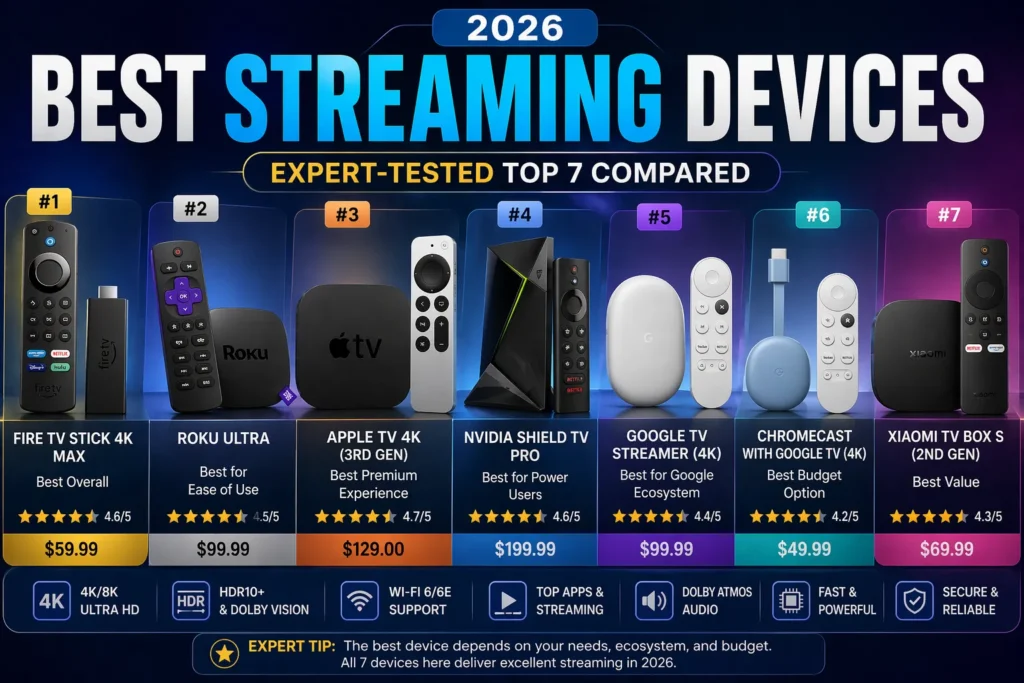
Which streaming device is best for your TV?
Rule out any device that does not support your essential apps in your country. Then compare the remaining choices by remote usability, network connection and total hardware cost. The best streaming devices are those that solve a real problem with your current setup. If your television already runs everything you need reliably, keeping it may be the better decision.
The right streaming device is the one that supports your essential apps and fits the television and network you already own. Comparing processor names alone will not reveal whether your preferred player is available. Start with the exact device model, operating system and country.
Compare the main device families
- Fire TV: check the exact model and operating system. Amazon lists devices using both Fire OS and Vega OS, so app compatibility cannot be assumed across the whole range.
- Apple TV: check tvOS app support, the remote layout and whether the selected model includes Ethernet.
- Roku: verify that every must-have service has a supported app for your country and device.
- Google TV: check app availability, storage needs and the ports on the exact product.
For model identification, use Amazon's official device list. For Apple's hardware options, see the official Apple TV specifications. This guide does not claim side-by-side benchmark measurements.
New checklist: buy for the missing feature
Write down what your current television cannot do. It might lack one app, reliable remote navigation or the connection option you need. A new box is useful only if it solves that actual problem.
- Check the required apps before choosing a brand.
- Confirm TV inputs and supported picture and sound formats.
- Check wired-network support if your setup needs it.
- Include necessary adapters and cables in the total cost.
- Confirm return conditions before opening or activating the product.
IPTV players need a separate compatibility check
A subscription that works in one app does not prove the same app exists on every platform. Confirm the login format, supported device and any player licence fee. Start with the player comparison and the Firestick checklist.
Does a 4K device upgrade every stream?
No. The source, subscription, app and TV all affect the output you can use. Check your actual programmes rather than treating the number on the product box as a guarantee.